 TellPip
Client memory
Pip remembers people, promises and open points, brings them back in the next call, and keeps it all on your computer.
Updated 30 October 2026
Contents
What client memory does
After each call, TellPip writes down what matters about the people, companies and projects you talked about: who they are, what you promised each other, what they asked for, what is still open. The next time they come up, Pip reminds you before you even have to ask.
The result is a relationship with your clients that is always on point: you walk into every call already knowing what you owe and what you are owed, and no promise gets left behind.
Client memory is included in Solo, in Enterprise, in the 5-hour pack and in the free trial (5 sessions of up to 10 minutes). Remember calls is on by default: Pip starts learning from your very first call.
How Pip reminds you
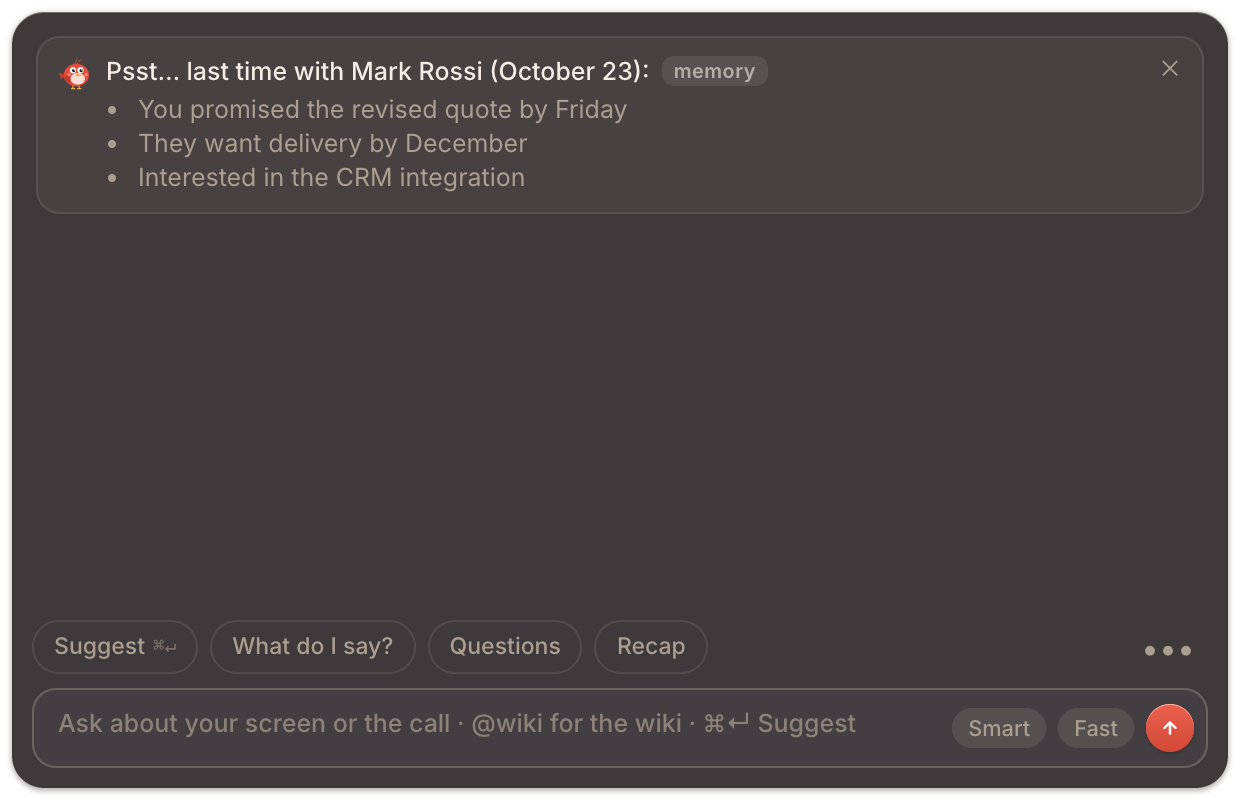
When someone you have already met is picked or mentioned in a call, a card appears in the chat: Psst… last time with followed by their name and the date, with the points that really matter.
During a session you can also tell Pip who is taking part: in the chat ••• menu, choose Who’s in the call and pick the people.
The memory follows the call's mode: in a sales call Pip uses the memories that came from sales calls, in a consultation those from consultations. That way every reminder stays relevant to its context. Each person's profile, their "who they are", is always available, in any mode.
The Memory page
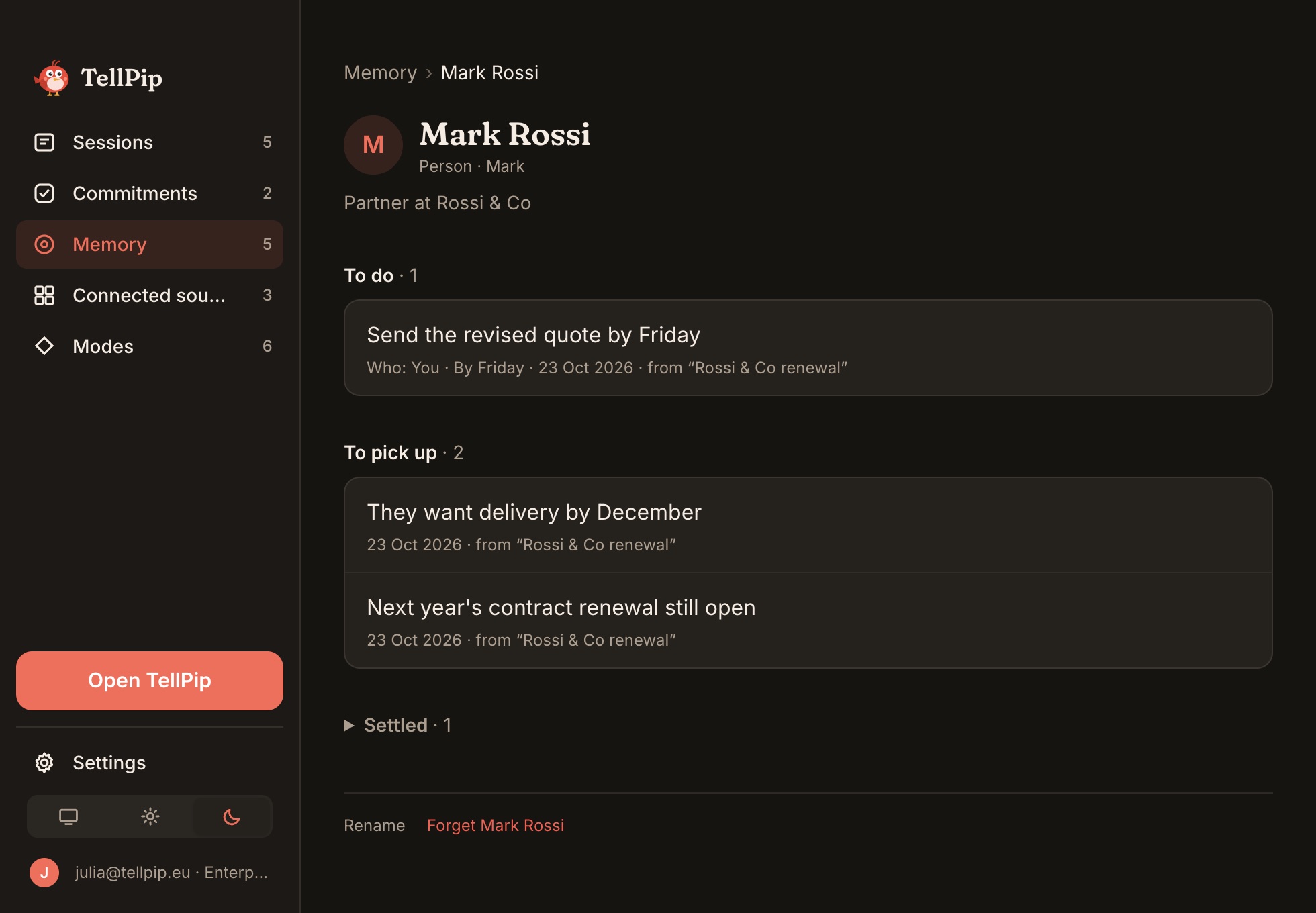
Open TellPip's main window with ⌘ ⇧ T and select Memory in the sidebar. The page is organised on three levels, from the big picture to the single detail:
- The cards: one for each Person, Company or Project you work with.
- The card: the "who they are" profile and the memories gathered in four sections, To do, To pick up, Settled and Done and closed. If you have linked your wiki to the memory, the From the wiki box also shows the description from the page about that person or company.
- The single memory: the detail of what Pip wrote down, with its history.
Edit, complete and forget
On a single memory
- Edit it with ✎ to update it in an instant.
- Mark as done when a commitment is kept, or Reopen it.
- Delete this memory to remove that single item.
On a card
- Rename: the old name stays as an alias, so Pip recognises the person even when they are mentioned by their previous name.
- Forget followed by the name: removes the whole card.
Everything
Delete all memory, then confirm: the memory starts again from zero, for good.
How Pip learns
Pip learns from your calls: at the end of each one it updates the cards with what came up. You'll find the memories from each call in the session's What it learned tab, where you can refine them with the pencil before they settle into the memory. See Notes, transcript and follow-up email.
The memory always stays consistent with your archive: when you delete a session, the memories that came only from that call go with it.
Memory and wiki
With Enterprise, the memory talks to your knowledge base. Turn on Link to Memory on a connected source: the From the wiki box appears on a person's or a company's card, and the description from their page also goes into the reminder Pip shows you in the call. After each call, Propose to the wiki brings the news into the client's page too. See Connected sources.
Your preferences: a Pip made for you
Pip doesn't only learn from your clients: it also learns from you. Next to each answer you'll find 👍 and 👎. With a simple click you tell it what was useful and what you'd like done differently, and Pip takes it into account, together with the way you write to it in the chat.
Day after day, your preferences profile takes shape: the tone you like, the length you prefer, the kind of answer you really need. You'll find it in your preferences card, on the Memory page.
The result? Answers ever more tailored to the way you work. The more you use TellPip, the more Pip speaks your language.
Calls not to remember
Some calls deserve to stay private. Choose Don’t remember this call from the chat menu during the call, or from the session afterwards: Pip keeps nothing from that call.
A memory that stays valuable
- Answer the confirmations Pip asks for after a call: the memory stays accurate, with a single card for each person.
- Use 👍 and 👎 on the answers: every preference you express brings Pip even closer to your style.
- Mark commitments as done once they are kept: the reminder in the next call will show exactly what is still open.
- Rename cards when someone changes company or a project changes name: the whole history stays in one place.
- Before an important call, take a look at the client's card: one minute that makes the difference.
Privacy
- The memory is kept only on your computer. When Pip uses it to answer, only a short briefing about the people in the call is added to the question. See What stays on your computer.
- You always decide what stays: edit, mark as done or forget at any time.
- Want to try it? Start the free trial (5 free sessions, no card needed): client memory is included, together with all the add-ons.
Cosa fa la memoria dei clienti
Dopo ogni call, TellPip annota ciò che conta delle persone, delle aziende e dei progetti di cui avete parlato: chi sono, cosa vi siete promessi, cosa hanno chiesto, cosa è rimasto aperto. La volta successiva che compaiono, Pip te lo ricorda prima ancora che tu debba chiederlo.
Il risultato è un rapporto con i clienti sempre puntuale: entri in ogni call sapendo già cosa devi e cosa ti devono, e nessuna promessa resta indietro.
La memoria dei clienti è inclusa in Solo, in Enterprise, nel pacchetto 5 ore e nella prova gratuita (5 sessioni da 10 minuti al massimo). Ricorda le call è attivo di default: Pip inizia a imparare fin dalla prima call.
Come te lo ricorda Pip
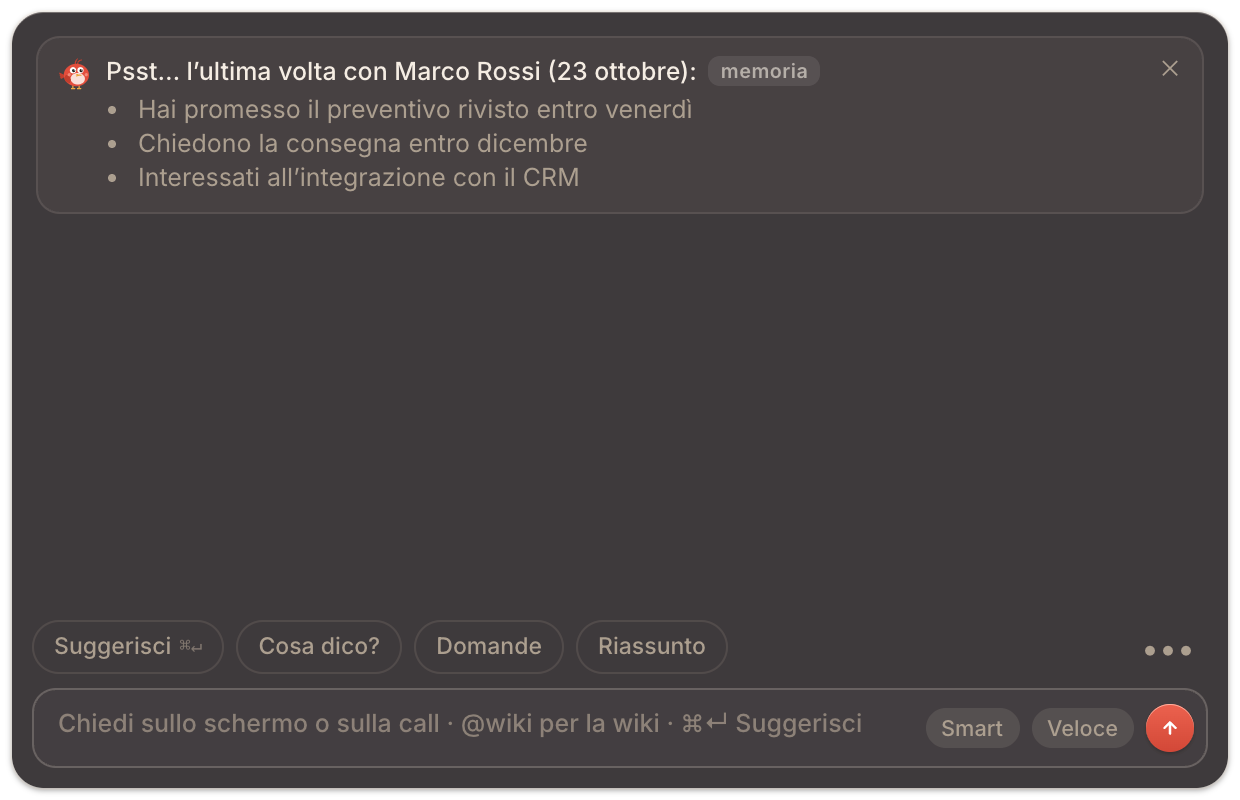
Quando in una call viene selezionata o nominata una persona che hai già incontrato, nella chat compare una scheda: Psst… l’ultima volta con seguito dal nome e dalla data, con i punti che contano davvero.
Durante una sessione puoi anche indicare a Pip chi partecipa: nel menu ••• della chat scegli Chi c’è in call e seleziona le persone.
La memoria segue la modalità della call: in una call di vendita Pip usa i ricordi nati nelle call di vendita, in una consulenza quelli delle consulenze. Così ogni promemoria resta pertinente al contesto. Il profilo di ogni persona, il suo «chi è», è sempre disponibile, in qualunque modalità.
La pagina Memoria
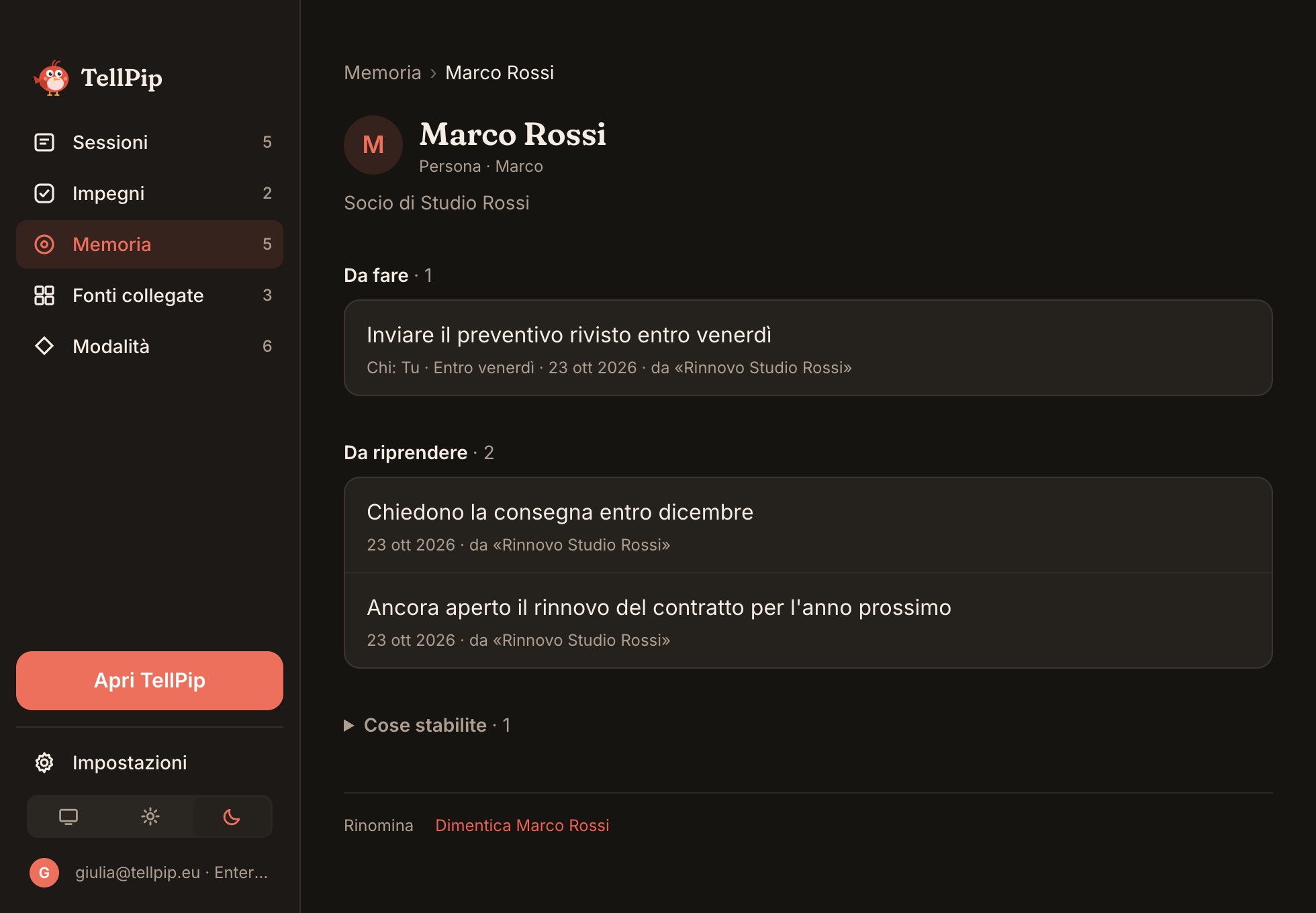
Apri la finestra principale di TellPip con ⌘ ⇧ T e seleziona Memoria nella barra laterale. La pagina è organizzata su tre livelli, dal quadro generale al singolo dettaglio:
- Le schede: una per ogni Persona, Azienda o Progetto con cui lavori.
- La scheda: il profilo «chi è» e i ricordi raccolti in quattro sezioni, Da fare, Da riprendere, Cose stabilite e Fatti e chiusi. Se hai collegato la tua wiki alla memoria, il riquadro Dalla wiki mostra anche la descrizione della pagina dedicata a quella persona o azienda.
- Il singolo ricordo: il dettaglio di ciò che Pip ha annotato, con la sua storia.
Modifica, completa e dimentica
Su un singolo ricordo
- Modificalo con ✎ per aggiornarlo in un istante.
- Segna come fatto quando un impegno è mantenuto, oppure Riapri.
- Elimina questo ricordo per rimuovere la singola voce.
Su una scheda
- Rinomina: il vecchio nome resta come alias, così Pip riconosce la persona anche quando viene citata con il nome precedente.
- Dimentica seguito dal nome: rimuove l’intera scheda.
Tutto
Cancella tutta la memoria, poi conferma: la memoria riparte da zero, in modo definitivo.
Come impara Pip
Pip impara dalle tue call: al termine di ognuna aggiorna le schede con ciò che è emerso. Trovi i ricordi di ogni call nella scheda Cosa ha imparato della sessione, dove puoi rifinirli con la matita prima che entrino stabilmente nella memoria. Vedi Note, trascrizione ed email di follow-up.
La memoria resta sempre coerente con il tuo archivio: quando elimini una sessione, con lei se ne vanno anche i ricordi nati soltanto in quella call.
Memoria e wiki
Con Enterprise, la memoria dialoga con la tua knowledge base. Attiva Collega alla Memoria su una fonte collegata: nella scheda di una persona o di un’azienda compare il riquadro Dalla wiki, e la descrizione della sua pagina entra anche nel promemoria che Pip ti mostra in call. Dopo ogni call, con Proponi alla wiki porti le novità anche nella pagina del cliente. Vedi Fonti collegate.
Le tue preferenze: un Pip su misura per te
Pip non impara solo dai tuoi clienti: impara anche da te. Accanto a ogni risposta trovi 👍 e 👎. Con un semplice clic gli dici cosa ti è stato utile e cosa vorresti diverso, e Pip ne tiene conto, insieme al modo in cui gli scrivi in chat.
Giorno dopo giorno, prende forma il tuo profilo di preferenze: il tono che apprezzi, la lunghezza che preferisci, il tipo di risposta che ti serve davvero. Lo trovi nella scheda delle tue preferenze, nella pagina Memoria.
Il risultato? Risposte sempre più su misura per il tuo modo di lavorare. Più usi TellPip, più Pip parla la tua lingua.
Call da non ricordare
Alcune call meritano di restare riservate. Scegli Non ricordare questa call dal menu della chat durante la call, oppure dalla sessione in seguito: Pip non trattiene nulla di quella call.
Una memoria sempre preziosa
- Rispondi alle conferme che Pip ti chiede dopo una call: la memoria resta precisa, con una sola scheda per ogni persona.
- Usa 👍 e 👎 sulle risposte: ogni preferenza che esprimi rende Pip ancora più vicino al tuo stile.
- Segna come fatti gli impegni mantenuti: il promemoria della call successiva mostrerà esattamente ciò che è ancora aperto.
- Rinomina le schede quando qualcuno cambia azienda o un progetto cambia nome: la storia resta tutta in un unico posto.
- Prima di una call importante, dai un’occhiata alla scheda del cliente: un minuto che fa la differenza.
Riservatezza
- La memoria è custodita esclusivamente sul tuo computer. Quando Pip la usa per rispondere, alla domanda si aggiunge soltanto un breve promemoria sulle persone in call. Vedi Cosa resta sul tuo computer.
- Sei sempre tu a decidere cosa resta: modifichi, segni come fatto o dimentichi in qualsiasi momento.
- Vuoi provarla? Attiva la prova gratuita (5 sessioni gratuite, senza carta): la memoria dei clienti è inclusa, insieme a tutte le funzioni extra.
Related articles
Need anything else? We’re here for you.
Write to us