 TellPip
Discreet, not deceptive: our rules for AI in your calls
An assistant in a meeting should help you think, not help you pretend. The principles that guide TellPip, and the product choices that come from them.

There is an easy way to sell AI for meetings: promise people they can fake it. Sound like an expert you aren’t, answer questions you never prepared for.
We chose a different path, because we believe in a higher idea of what a good call is. Nobody remembers the meeting where you recited a perfect paragraph. Everyone remembers the one where you knew their situation, kept your promises and asked the right question. TellPip exists for that. We wrote down a few rules, and they are the compass we use to decide what goes into the product.
Rule one: nobody joins your meeting
Many meeting tools work by sending a bot into the call: it appears as a participant, records everyone and sends the recording somewhere else. And the atmosphere changes, because people speak differently when a stranger with a red dot is listening.
TellPip never joins. It works from your computer and listens the way you do: through your microphone and your speakers. No extra name among the participants, no invitation to accept, nothing for the others to install. A technical choice and, at the same time, a matter of style: the call stays between the people who are part of it.

Rule two: invisibility is for a tidy screen
TellPip can keep its own windows out of screen sharing and recordings. You will find it as Invisible when sharing your screen, and it’s on by default. The reason is very practical.
When you present a proposal or walk someone through a contract, your screen becomes a shared space. Nobody needs to see your notes, the follow-up email you’re preparing or a panel of reminders, just as you wouldn’t project your notebook on the wall. Invisibility keeps the shared picture tidy: the client sees your slides, you see your slides and Pip.
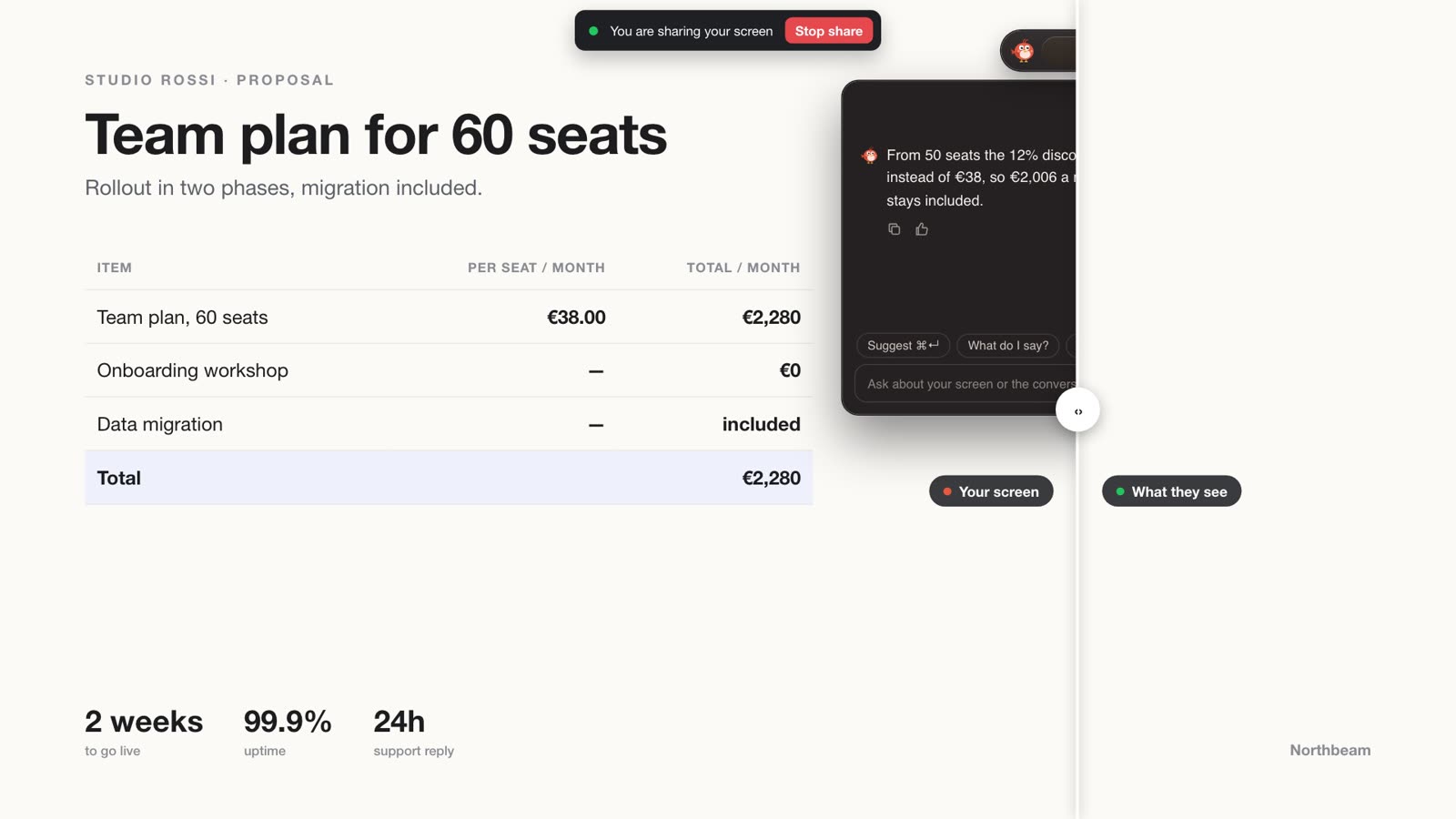
Your notes have always been yours. Invisibility keeps them off the projector.
It’s a tool for professional polish, not a way to make people believe someone else is speaking: when a situation calls for openness, the right choice is to be open. The invisibility guide explains in detail how the setting works.
Rule three: you decide what to say
Pip whispers, you speak. Every answer TellPip writes is a suggestion: a fact found in your documents, a reminder of what you promised last time, a question worth asking. You read it, you weigh it and you make it yours, in your own words. TellPip helps you find and remember information: it doesn’t give legal or financial advice, and professional judgement always stays yours.
That’s why the answers are short and show where they come from. A suggestion you can check in two seconds is a valuable ally, especially in front of a client. And when something isn’t in your material, Pip tells you clearly: that’s what makes it reliable.
Rule four: be open where it matters
Using notes in a meeting is normal. Using a well-organised notebook is normal. Using an assistant that helps you remember and prepare is, for us, the same thing in a modern form. Still, there are settings where it’s good to say so openly.
- Your profession may have rules about tools that process client conversations.
- Your company may have a policy on AI assistants in meetings.
- A negotiation, an interview or an exam may have explicit rules about outside help.
- And sometimes it’s simply courtesy: “I take notes with an assistant, is that all right?” costs nothing.
We created TellPip for professionals who want to do their best with their own knowledge. It is not designed for exams or for settings where outside help is not allowed, and we never present it that way. The Looking for work template was built in the same spirit: it helps you prepare for interviews, practise the most likely questions and get clear on what to say about yourself, fully within the rules of every selection process.
Rule five: transcription, with full awareness
TellPip transcribes the conversation on your computer so it can assist you and write your notes. Rules about recording and transcribing differ between countries and between professions, and they may require you to tell the other participants.
Our advice is simple: know the rules that apply to you and, if in doubt, tell people at the start of the call. This article isn’t legal advice: for specific cases, turn to your advisor or your professional body. The best assistant is one everyone is comfortable with.
The choices that come from them
Principles matter when they turn into the product. Here is where ours show up:
- No bot, ever. TellPip listens from your computer and never enters a meeting as a participant.
- Audio stays on your computer. Transcription happens locally, thanks to a model that works right on your computer, and the sound is never uploaded. More in why TellPip transcribes on your computer.
- Short, sourced suggestions. Answers are built from your documents and your memory, so you can check them in an instant.
- A call Pip can forget. Don’t remember this call keeps a meeting out of client memory, and you can delete any session.
- Controls always in sight. Invisibility, the screenshot and real-time answers are clear controls that you see and manage.
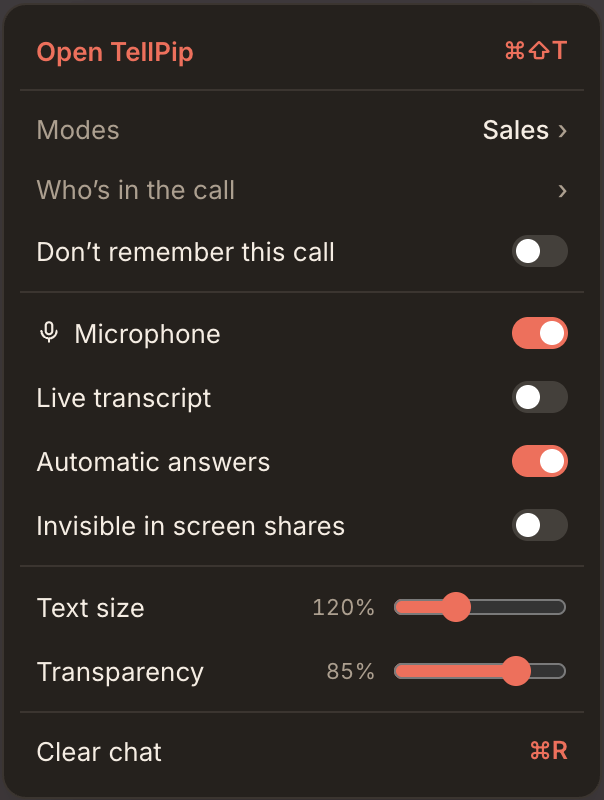
We will keep adding new features to TellPip, and these rules will always be the compass we choose them by. Got an idea? Write to us.
C’è un modo facile di vendere l’AI per le riunioni: promettere che potrai fingere. Sembrare l’esperto che non sei, rispondere a domande per cui non ti sei mai preparato.
Noi abbiamo scelto un’altra strada, perché crediamo in un’idea più alta di cosa sia una buona call. Nessuno ricorda la riunione in cui hai recitato un paragrafo perfetto. Tutti ricordano quella in cui conoscevi la loro situazione, hai mantenuto le promesse e hai posto la domanda giusta. TellPip esiste per questo. Abbiamo messo per iscritto alcune regole, e sono la bussola con cui decidiamo cosa entra nel prodotto.
Prima regola: nella tua riunione non entra nessuno
Molti strumenti per le riunioni funzionano inviando un bot nella call: compare tra i partecipanti, registra tutti e spedisce la registrazione altrove. E l’atmosfera cambia, perché si parla diversamente quando ad ascoltare c’è un estraneo con il pallino rosso.
TellPip non entra mai. Lavora dal tuo computer e ascolta come ascolti tu: dal microfono e dalle casse. Nessun nome in più tra i partecipanti, nessun invito da accettare, nulla da installare per gli altri. Una scelta tecnica e, insieme, di stile: la call resta tra le persone che ne fanno parte.

Seconda regola: l’invisibilità serve a uno schermo ordinato
TellPip può escludere le proprie finestre dalla condivisione schermo e dalle registrazioni. La trovi come Invisibile nelle condivisioni schermo, ed è attiva di default. Il motivo è molto concreto.
Quando presenti una proposta o scorri un contratto insieme a qualcuno, il tuo schermo diventa uno spazio condiviso. Nessuno ha bisogno di vedere i tuoi appunti, la mail di follow-up in preparazione o un pannello di promemoria, così come non proietteresti il tuo taccuino sulla parete. L’invisibilità mantiene ordinata l’immagine condivisa: il cliente vede le slide, tu vedi le slide e Pip.
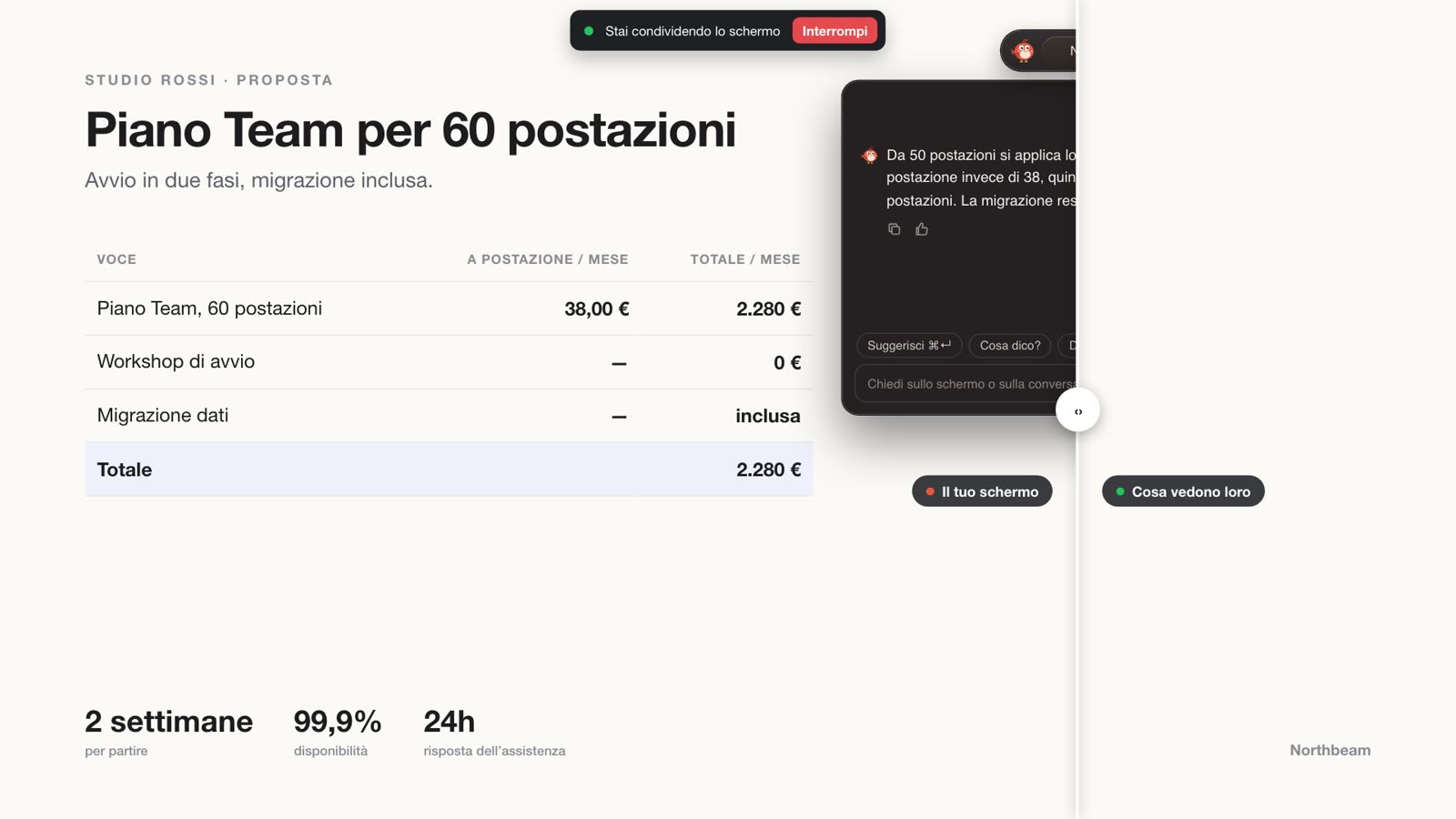
I tuoi appunti sono sempre stati tuoi. L’invisibilità li tiene lontani dal proiettore.
È uno strumento di eleganza professionale, non un modo per far credere che a parlare sia qualcun altro: quando una situazione richiede trasparenza, la scelta giusta è essere trasparenti. La guida all’invisibilità spiega nel dettaglio come funziona l’impostazione.
Terza regola: cosa dire lo decidi tu
Pip sussurra, tu parli. Ogni risposta di TellPip è un suggerimento: un dato trovato nei tuoi documenti, un promemoria di ciò che avevi promesso l’ultima volta, una domanda che vale la pena porre. Tu la leggi, la valuti e la fai tua, con le tue parole. TellPip ti aiuta a trovare e ricordare le informazioni: non fornisce consulenza legale o finanziaria, e il giudizio professionale resta sempre tuo.
Per questo le risposte sono brevi e indicano da dove provengono. Un suggerimento che verifichi in due secondi è un alleato prezioso, soprattutto davanti a un cliente. E quando un’informazione non è nel tuo materiale, Pip te lo dice con chiarezza: è ciò che lo rende affidabile.
Quarta regola: trasparenza quando conta
Usare appunti in riunione è normale. Usare un quaderno ben organizzato è normale. Usare un assistente che ti aiuta a ricordare e a prepararti è, per noi, la stessa cosa in forma moderna. Ci sono però contesti in cui è bello dirlo apertamente.
- La tua professione può avere regole sugli strumenti che trattano le conversazioni con i clienti.
- La tua azienda può avere una policy sugli assistenti AI in riunione.
- Una trattativa, un colloquio o un esame possono avere regole esplicite sull’aiuto esterno.
- E a volte è semplice cortesia: «Prendo appunti con un assistente, va bene?» non costa nulla.
Abbiamo creato TellPip per professionisti che vogliono dare il meglio con la propria conoscenza. Non è pensato per gli esami né per i contesti in cui l’aiuto esterno è escluso, e non lo presentiamo mai così. Anche il modello Cerco lavoro nasce con questo spirito: ti aiuta a preparare i colloqui, a esercitarti sulle domande più probabili e a mettere a fuoco cosa raccontare di te, nel pieno rispetto delle regole di ogni selezione.
Quinta regola: la trascrizione, in piena consapevolezza
TellPip trascrive la conversazione sul tuo computer per poterti assistere e redigere le note. Le regole su registrazione e trascrizione variano da paese a paese e da professione a professione, e possono prevedere di informare gli altri partecipanti.
Il nostro consiglio è semplice: conosci le regole che valgono per te e, nel dubbio, avvisa all’inizio della call. Questo articolo non è una consulenza legale: per i casi specifici, il riferimento è il tuo consulente o il tuo ordine professionale. L’assistente migliore è quello con cui tutti si sentono a proprio agio.
Le scelte che ne nascono
I principi contano quando si traducono nel prodotto. Ecco dove si vedono i nostri:
- Mai un bot. TellPip ascolta dal tuo computer e non entra mai in una riunione come partecipante.
- L’audio resta sul tuo computer. La trascrizione avviene in locale, grazie a un modello che lavora direttamente sul tuo computer, e il suono non viene mai caricato. Approfondisci in perché TellPip trascrive sul tuo computer.
- Suggerimenti brevi e con una fonte. Le risposte nascono dai tuoi documenti e dalla tua memoria, così puoi verificarle in un istante.
- Una call che Pip può dimenticare. Non ricordare questa call tiene una riunione fuori dalla memoria dei clienti, e puoi cancellare qualsiasi sessione.
- Controlli sempre visibili. Invisibilità, screenshot e risposte in tempo reale sono comandi chiari che vedi e gestisci tu.
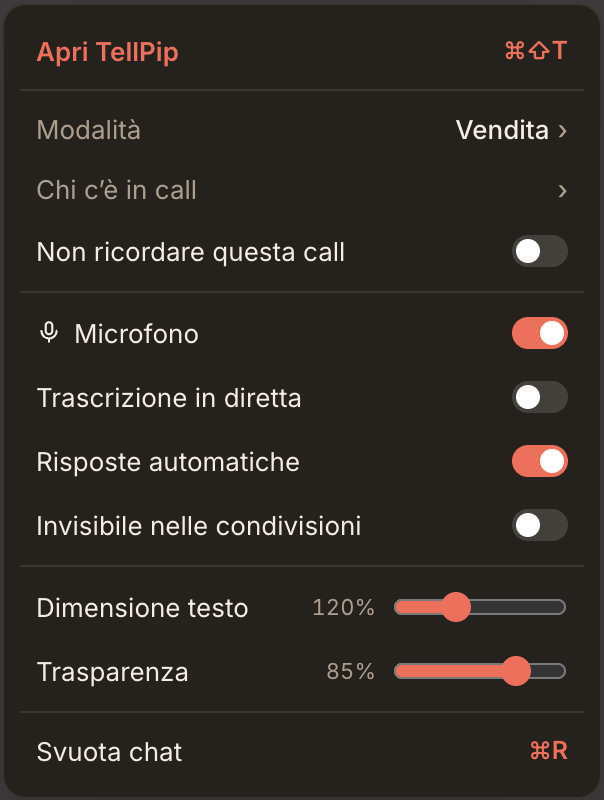
Continueremo ad arricchire TellPip con nuove funzioni, e queste regole saranno sempre la bussola con cui le scegliamo. Hai un’idea? Scrivici.