 TellPip
Ask your past calls
Who said what, and when: ask a single meeting, or the last call while you are already in the next one.
Updated 30 October 2026
Contents
Ask, instead of rereading
A one-hour call holds thousands of words. When you need a detail, a date, a figure or a promise, there's no need to scroll through the whole transcript: ask, and TellPip finds it for you in a few moments.
It's like having an assistant who followed every meeting with full attention and remembers everything, ready to answer you whenever you need it.
Ask a single meeting
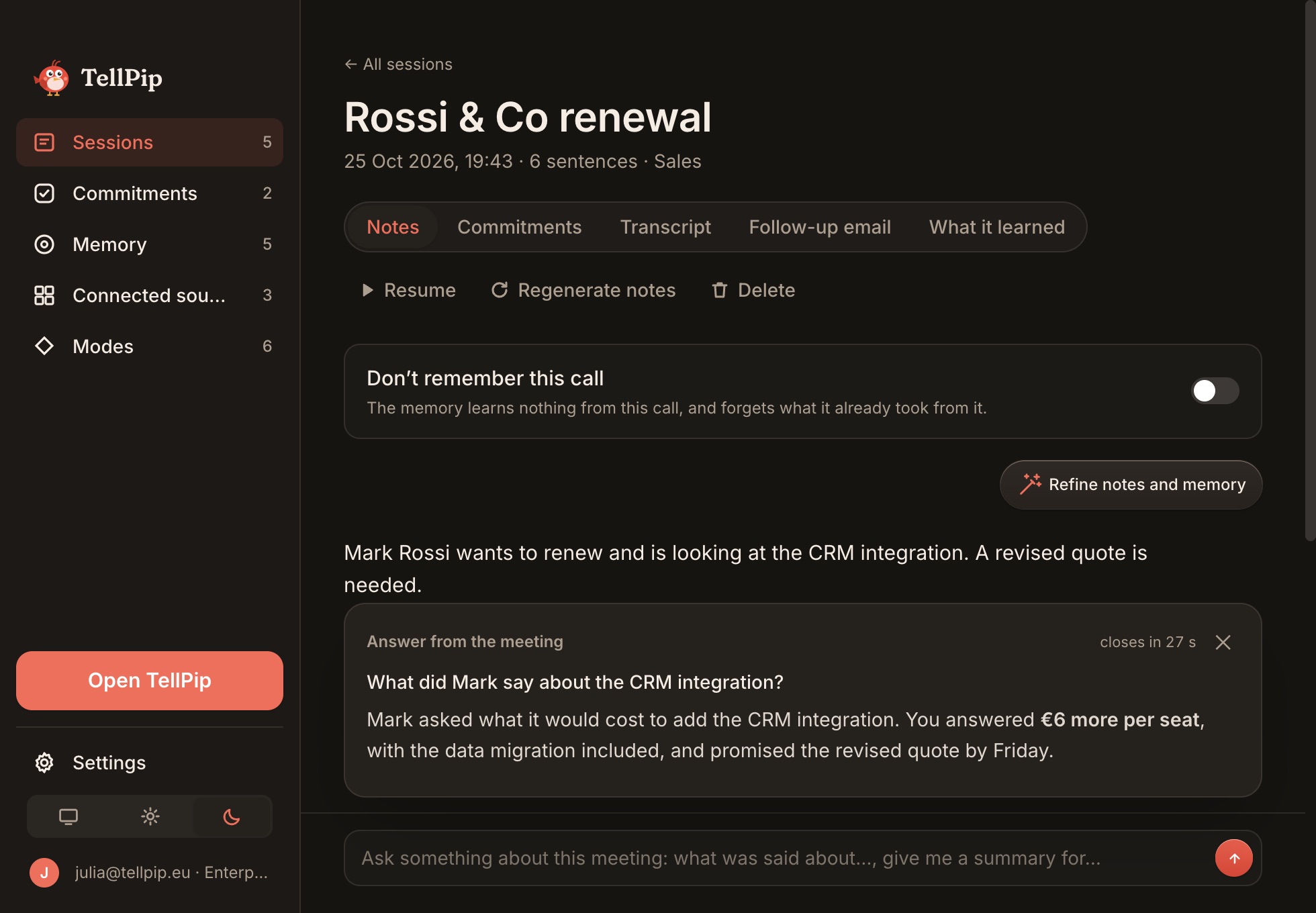
- Open TellPip's main window with ⌘ ⇧ T, select Sessions in the sidebar and pick the meeting you're interested in.
- At the bottom of the session, type your question in the Ask something about this meeting box. For example: "What did Luca promise on delivery times?"
- Press Enter.
TellPip answers from that meeting's transcript and notes, in an Answer from the meeting card, in the language you wrote the question in. The card closes on its own after about 30 seconds, and you can ask a new question at any time.
Ask during a call
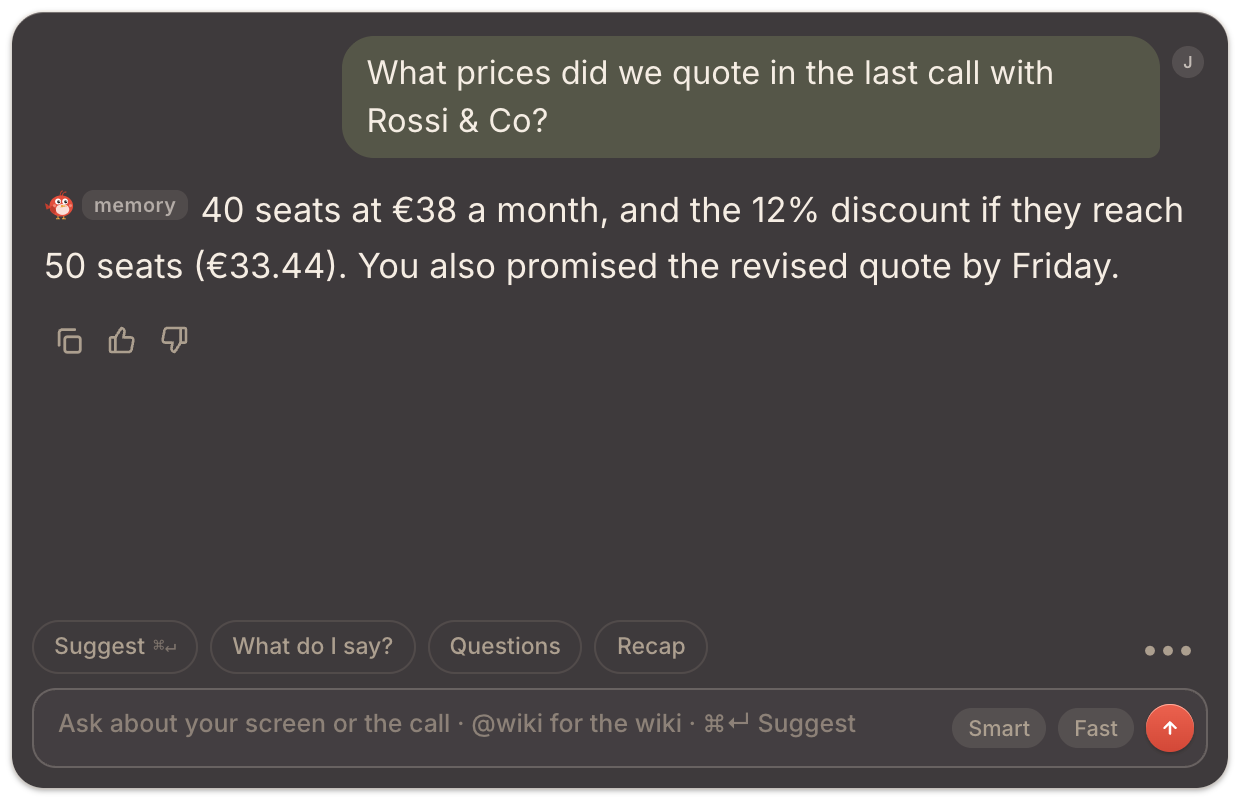
In the live chat you can refer to the last call. For example: "What did we decide in the last call?" or "Which documents did I promise in the last call?". It's invaluable at the start of a follow-up, when you want to pick up exactly where you left off.
For example, two minutes before a follow-up with a supplier you type "What prices did they quote in the last call?": Pip answers with the figures and who gave them, and you join the call with the numbers already in front of you.
Questions that work
Facts
- "Which dates did we agree on?"
- "What budget did they mention?"
Commitments
- "What did they ask us to send?"
- "What did I promise, and by when?"
The conversation
- "What objections came up about the price?"
- "Who was against the proposal, and why?"
Precise questions bring precise answers. "What did Marta say about the contract renewal?" gives you exactly what you're looking for, much more than "Tell me about the call".
Where the answer comes from
The answer comes only from that meeting: its transcript and its notes. Pip sticks to what was said and, when something doesn't appear in that call, tells you so clearly: so you always know what each answer is based on. To fine-tune a name in the notes, use Refine notes and memory on the session. See Notes.
Past calls or client memory?
Two tools that complement each other, so you forget nothing:
- Asking a meeting explores everything that was said in that call. It's the ideal tool for details: an exact figure, who said what, how an objection was put.
- Client memory keeps an always up-to-date summary for each person, company or project across all your calls: commitments, decisions, open points. It's the ideal tool for knowing where you stand with someone.
Together they turn the classic "where were we?" into a one-second question.
Tips for answers that always hit the mark
- Pick the right meeting: if a conversation took place over several sessions, ask the one where the topic you care about came up. To keep everything together, use ▶ Resume on the original session.
- For complete transcripts every time, make sure TellPip can hear everyone in the call: you'll find how in the Quick fixes section.
- For the most important names, confirm the spelling with Refine notes and memory and add them to the Vocabulary: from then on they will be spelled the way you want.
Next steps
Chiedi, invece di rileggere
Una call di un’ora contiene migliaia di parole. Quando ti serve un dettaglio, una data, una cifra o una promessa, non c’è bisogno di scorrere tutta la trascrizione: chiedi, e TellPip lo trova per te in pochi istanti.
È come avere un assistente che ha seguito ogni riunione con la massima attenzione e ricorda tutto, pronto a risponderti quando ne hai bisogno.
Chiedi a un singolo meeting
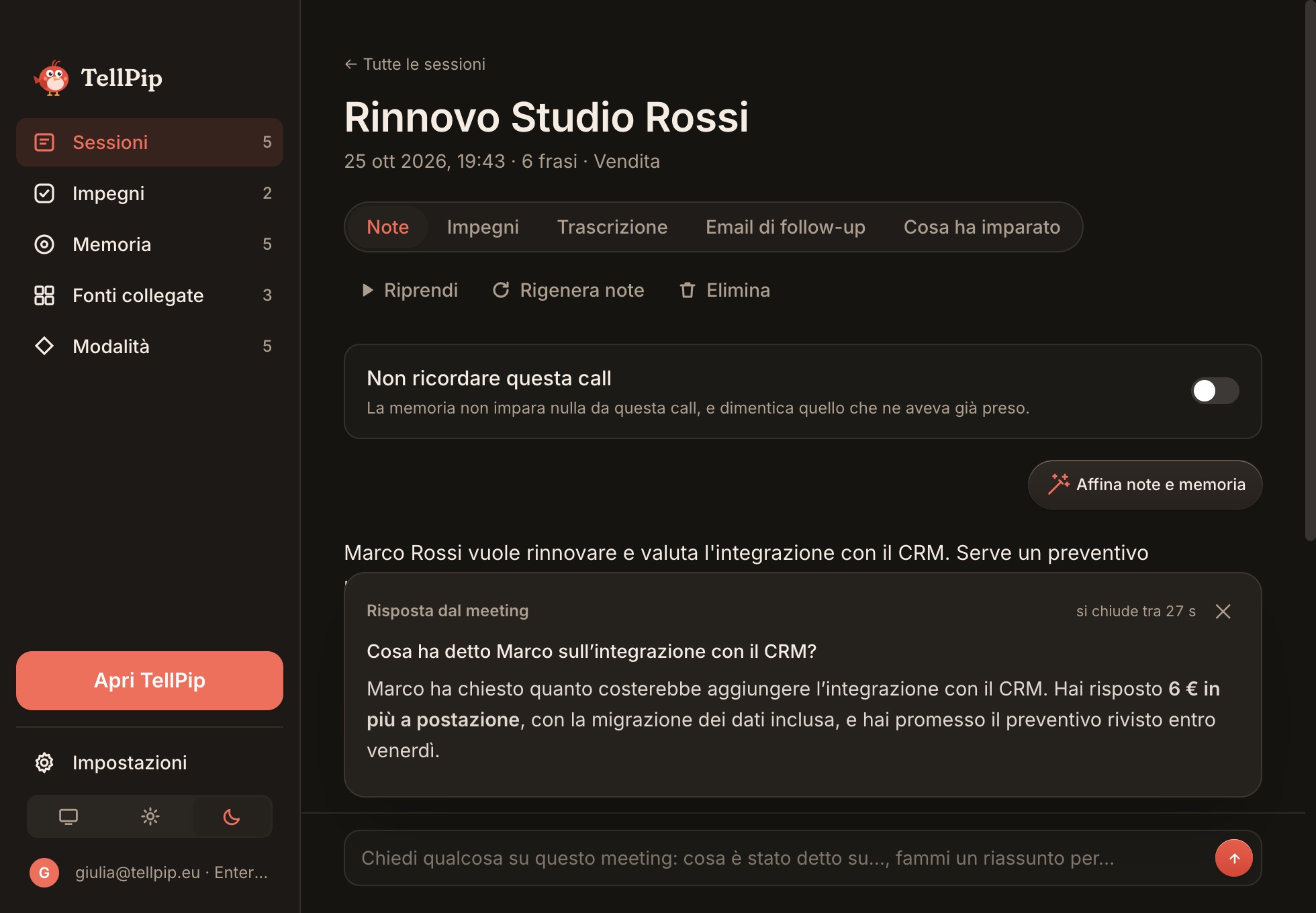
- Apri la finestra principale di TellPip con ⌘ ⇧ T, seleziona Sessioni nella barra laterale e scegli il meeting che ti interessa.
- In fondo alla sessione, scrivi la domanda nel riquadro Chiedi qualcosa su questo meeting. Per esempio: «Cosa aveva promesso Luca sui tempi di consegna?»
- Premi Invio.
TellPip risponde dalla trascrizione e dalle note di quel meeting, in una scheda Risposta dal meeting, nella lingua in cui hai scritto la domanda. La scheda si chiude da sola dopo circa 30 secondi, e puoi porre una nuova domanda in qualsiasi momento.
Chiedi durante una call
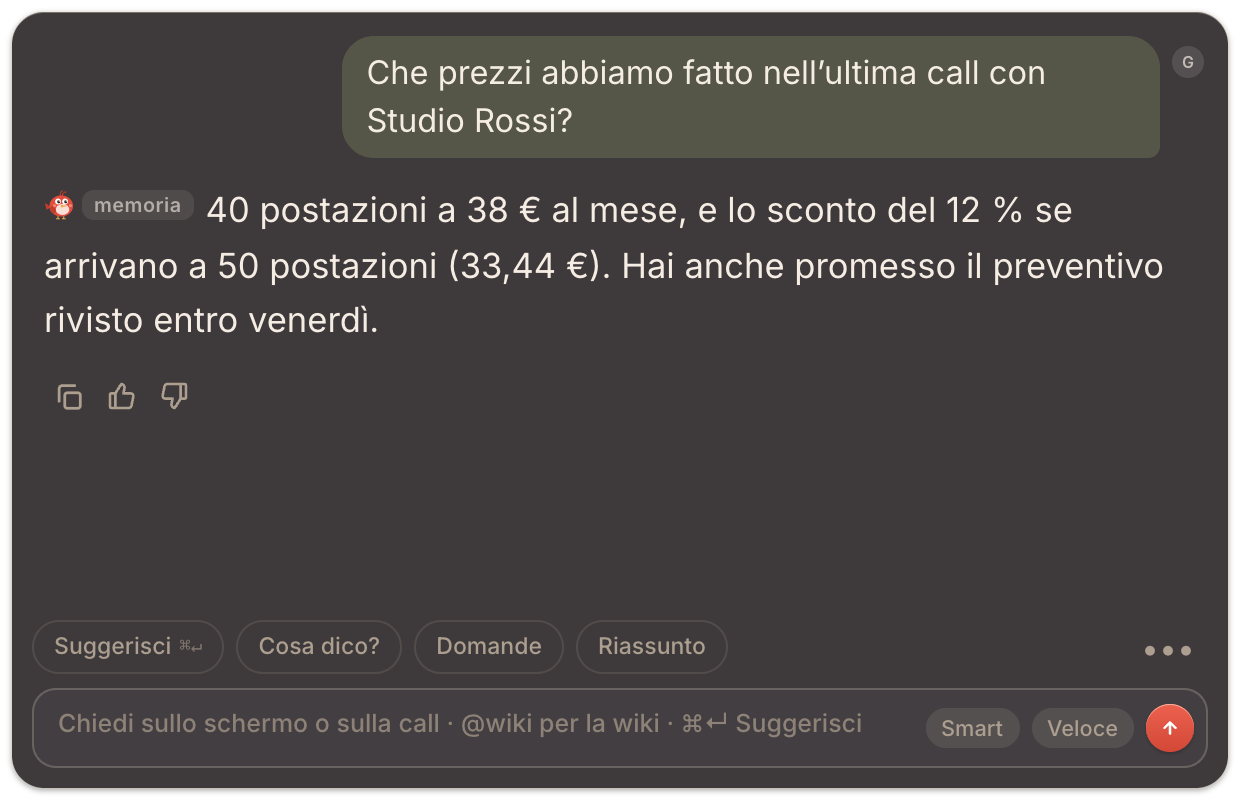
Nella chat dal vivo puoi riferirti all’ultima call. Per esempio: «Cosa avevamo deciso nell’ultima call?» oppure «Quali documenti ho promesso nell’ultima call?». È preziosissimo all’inizio di un follow-up, quando vuoi ripartire esattamente da dove eravate rimasti.
Per esempio, due minuti prima di un follow-up con un fornitore scrivi «Che prezzi ci avevano fatto nell’ultima call?»: Pip risponde con le cifre e con chi le ha indicate, e tu entri in call con i numeri già davanti.
Domande che funzionano
Fatti
- «Quali date abbiamo concordato?»
- «Che budget hanno citato?»
Impegni
- «Cosa ci hanno chiesto di mandare?»
- «Cosa ho promesso, e per quando?»
La conversazione
- «Che obiezioni sono uscite sul prezzo?»
- «Chi era contrario alla proposta, e perché?»
Domande precise portano risposte precise. «Cosa ha detto Marta sul rinnovo del contratto?» ti dà esattamente ciò che cerchi, molto più di «Raccontami la call».
Da dove nasce la risposta
La risposta nasce esclusivamente da quel meeting: la sua trascrizione e le sue note. Pip si attiene a ciò che è stato detto e, quando un’informazione non compare in quella call, te lo indica con chiarezza: così sai sempre su cosa si basa ogni risposta. Per rifinire un nome nelle note, usa Affina note e memoria sulla sessione. Vedi Note.
Call passate o memoria dei clienti?
Due strumenti complementari, per non dimenticare nulla:
- Chiedere a un meeting esplora tutto ciò che è stato detto in quella call. È lo strumento ideale per i dettagli: una cifra esatta, chi ha detto cosa, come è stata posta un’obiezione.
- La memoria dei clienti mantiene un riepilogo sempre aggiornato per ogni persona, azienda o progetto attraverso tutte le call: impegni, decisioni, punti aperti. È lo strumento ideale per sapere a che punto sei con qualcuno.
Insieme trasformano il classico «dove eravamo rimasti?» in una domanda da un secondo.
Consigli per risposte sempre mirate
- Scegli il meeting giusto: se una conversazione si è svolta in più sessioni, interroga quella in cui si è parlato del tema che ti interessa. Per tenere tutto insieme, usa ▶ Riprendi sulla sessione originale.
- Per trascrizioni sempre complete, verifica che TellPip possa ascoltare tutti i partecipanti: trovi le indicazioni nella sezione Soluzioni rapide.
- Per i nomi più importanti, conferma la grafia con Affina note e memoria e aggiungili al Vocabolario: da quel momento saranno scritti come vuoi tu.
Prossimi passi
Related articles
Need anything else? We’re here for you.
Write to us