 TellPip
Never forget a promise: how Pip remembers your clients
After every call, Pip fills in a card for each person, company and project. Here is what goes in it, when it comes in handy, and how you always stay in charge.

In a client relationship, the most delicate moment is not a hard question. It is the client reminding you of a promise: “You said you’d send the revised quote by Friday.” You did say that, of course. Three weeks and forty calls ago.
Client memory is TellPip’s answer to that moment. After each call, Pip writes down what matters about the people who were there. And the next time, it reminds you, before they even have to.
Cards, not transcripts
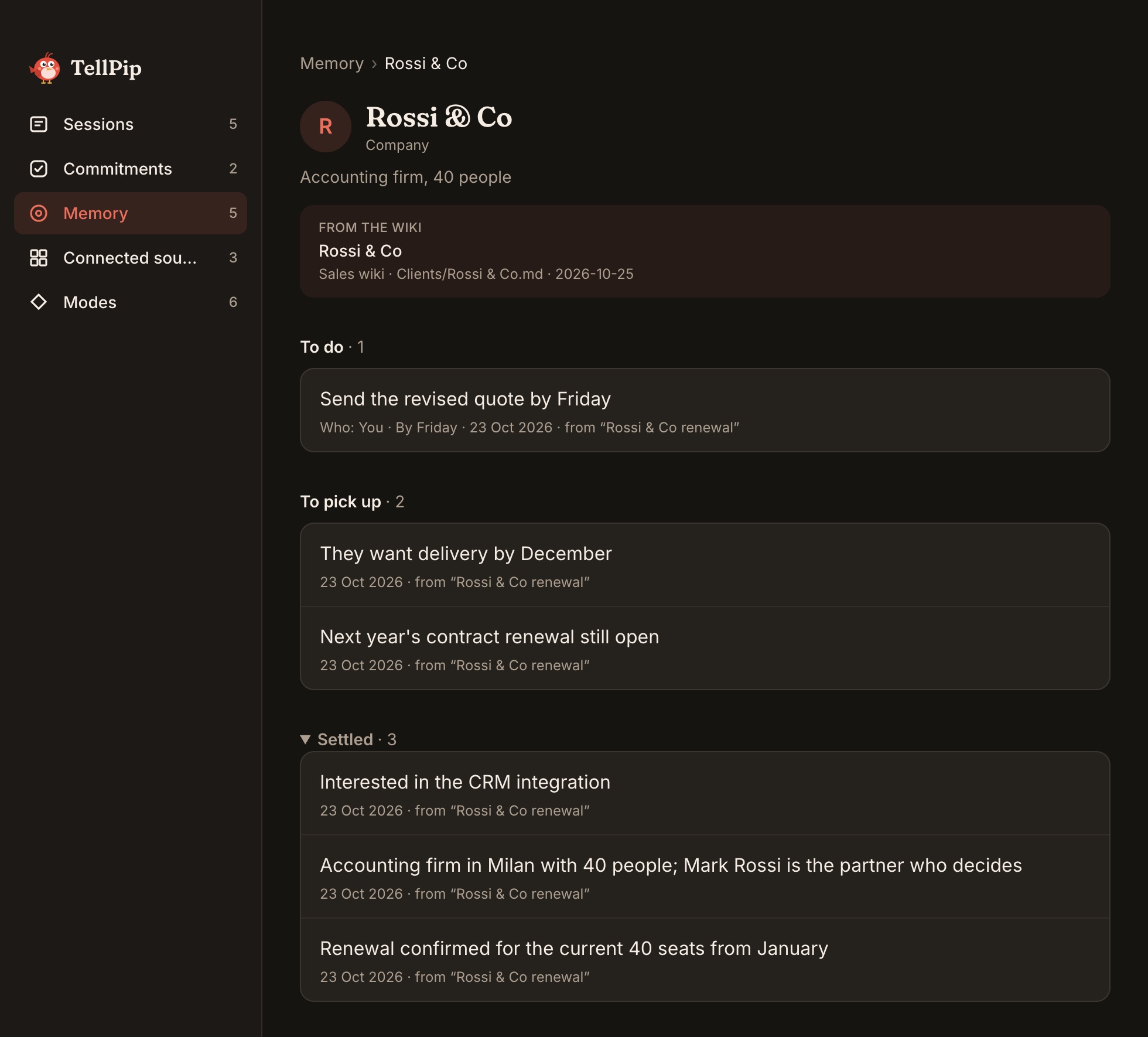
Memory is not an archive of old transcripts. It is a set of essential cards, one for each Person, Company or Project you work with. At the top of each card is who they are: role, company, how you know them. Then come four sections:
- To do: what was promised, by whom and by when.
- To pick up: points still open and topics to raise next time.
- Settled: decisions, preferences and recurring requests.
- Done and closed: commitments kept and points resolved, for the record.
Each entry is concise and designed to be read in a few seconds, because in a call every second counts.
What a card looks like
Here is a made-up example of a company card after two calls, to show you Pip’s level of detail:
- Who they are: a family-run furniture maker, about to open a second showroom. Main contact: the operations manager.
- To do: you send the revised quote by Friday; they send the floor plans of the new showroom.
- To pick up: contract renewal for next year.
- Settled: delivery in two batches, the first before December; calls in the morning; prices always with VAT shown separately.
- Done and closed: sample fabrics sent and received.
A few essential lines, and you know where the relationship stands before you say hello.
How it comes back
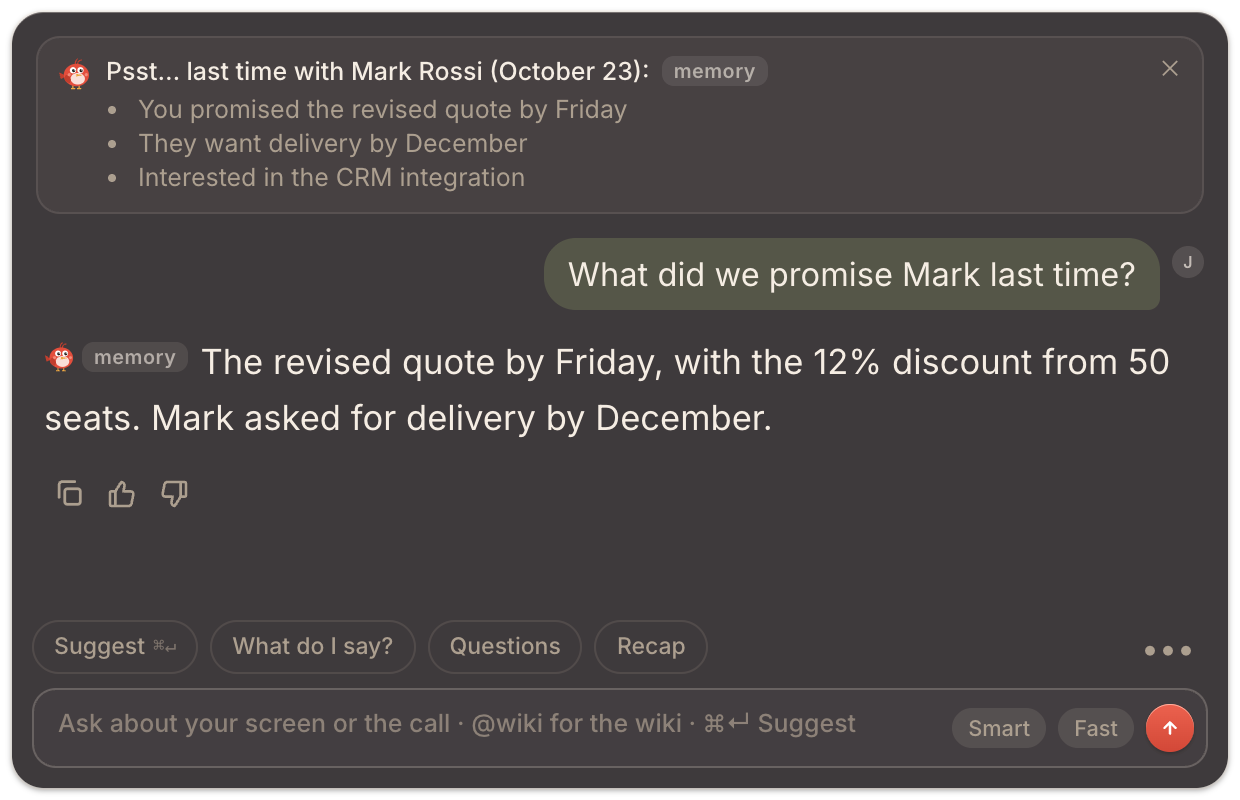
Memory is at its best at the right moment. When a person you know is selected in Who’s in the call or mentioned in the conversation, a card appears in the chat: Psst… last time with followed by their name and the date of your last call, and the few things that matter. What is still to do comes first.
Memory also enriches Pip’s answers. If the client asks “where are we on the renewal?”, Pip can answer drawing on what was said in earlier calls, not just this one. Answers that use it carry a memory tag, so you always know where the information came from.
Each context stays in its place: in each mode Pip recalls memories from calls of that kind, while it always knows who the people are. And with Enterprise, memory can also draw on your knowledge base.
The aim is simple: you walk into every call already knowing what you owe and what you are owed.
How Pip learns
With Remember calls on, which is the default, Pip learns from your calls and updates the cards at the end of each one, from the most meaningful parts of the conversation. To keep the memory accurate, it may ask you to quickly confirm a name or a date. And although memory already learns on its own, you can give Pip extra pointers by writing in the chat “remember that Marco prefers calls in the morning” or “forget the old delivery address”.
Each memory also keeps its own history, so you can see how a commitment or a decision has evolved.
And while Pip gets to know your clients, it gets to know you too. From the 👍 and 👎 next to every answer, and from the way you write to it in the chat, it builds your preference profile over time, which you’ll find on the Memory page: answers ever more tailored to the way you work.
You’re in charge
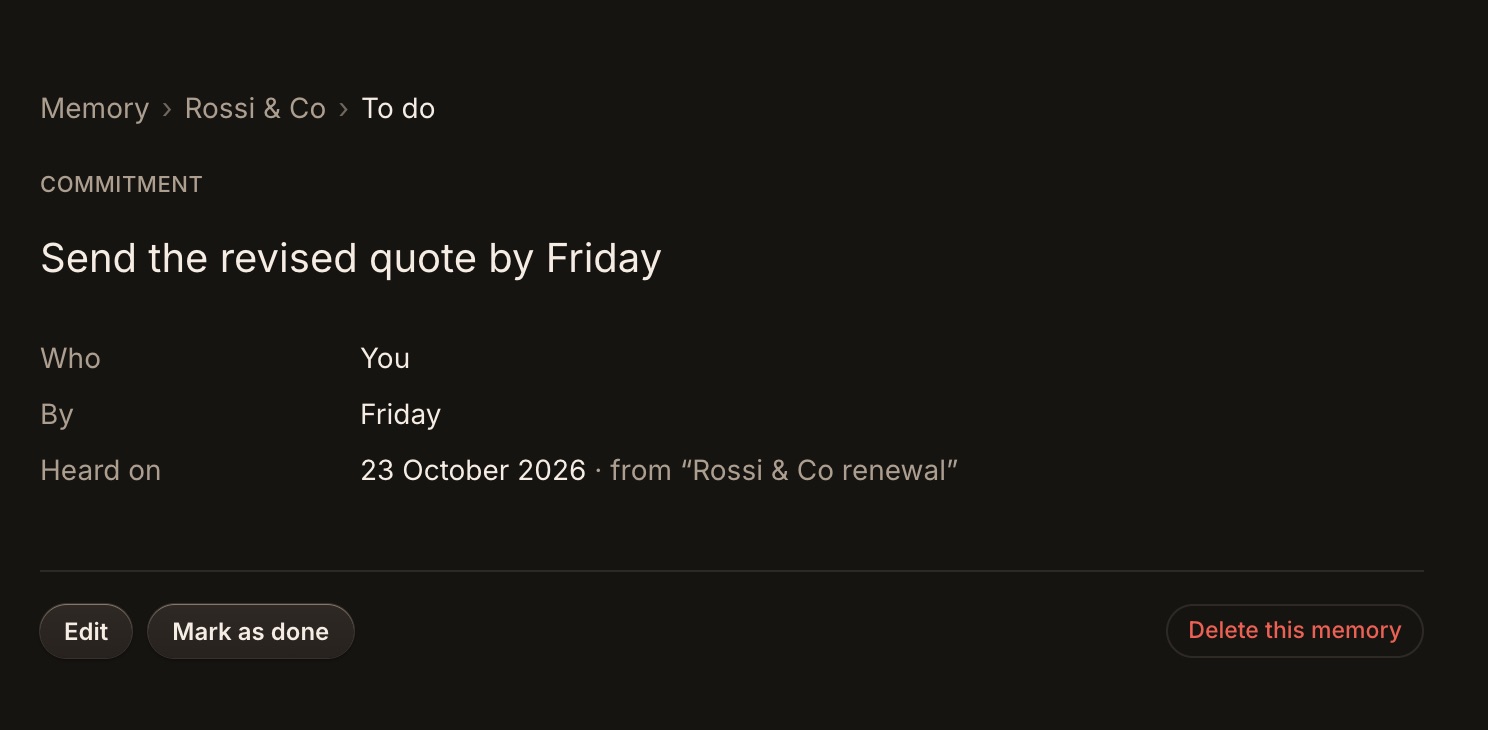
A truly useful memory is one you govern. Every part of it is managed from the Memory page of the main window: from the list of cards you open a card, and from there a single memory.
- Edit any line that needs updating.
- Mark as done a commitment you have kept, or Reopen it.
- Delete this memory to remove a single line.
- Rename a card: the old name is kept as an alias, so Pip still recognises it.
- Forget (followed by the name) to drop a person, company or project entirely.
- Delete all memory, with a confirmation, to start from zero.
Some calls deserve to stay out of memory: a private conversation, a personal matter, a meeting on a confidential subject. Choose Don’t remember this call from the chat’s menu during the call, or from the session later. Pip keeps nothing from that call. And if you delete a session, the memories that came only from that call go with it.
Everything on your computer
Memory is kept on your computer, alongside your sessions and notes. It isn’t shared with anyone. When Pip writes an answer, it uses a short briefing from the relevant cards, exactly as it does with the passages of your documents. And because the cards live on your computer, deleting them really deletes them: when you forget a person, their card is gone for good. The same goes for sessions and notes, which you can remove one by one or in bulk. The full picture is in What stays on your computer, and what the AI needs.
Who gets it
Client memory is included in Solo, in Enterprise and in the 5-hour pack, and it is not an add-on: it is the heart of TellPip. It is also available in the free trial, 5 free sessions with no card needed, so you can discover its value on your own calls. Prices are on the pricing page.
Ready to try it? Download TellPip, and read Client memory: what Pip remembers for the step-by-step guide.
Nel rapporto con un cliente, il momento più delicato non è una domanda difficile. È il cliente che ti ricorda una promessa: «Aveva detto che mi mandava il preventivo rivisto entro venerdì.» L’avevi detto, certo. Tre settimane e quaranta call fa.
La memoria dei clienti è la risposta di TellPip a quel momento. Dopo ogni call, Pip annota ciò che conta delle persone presenti. E la volta successiva te lo ricorda, prima ancora che debbano farlo loro.
Schede, non trascrizioni
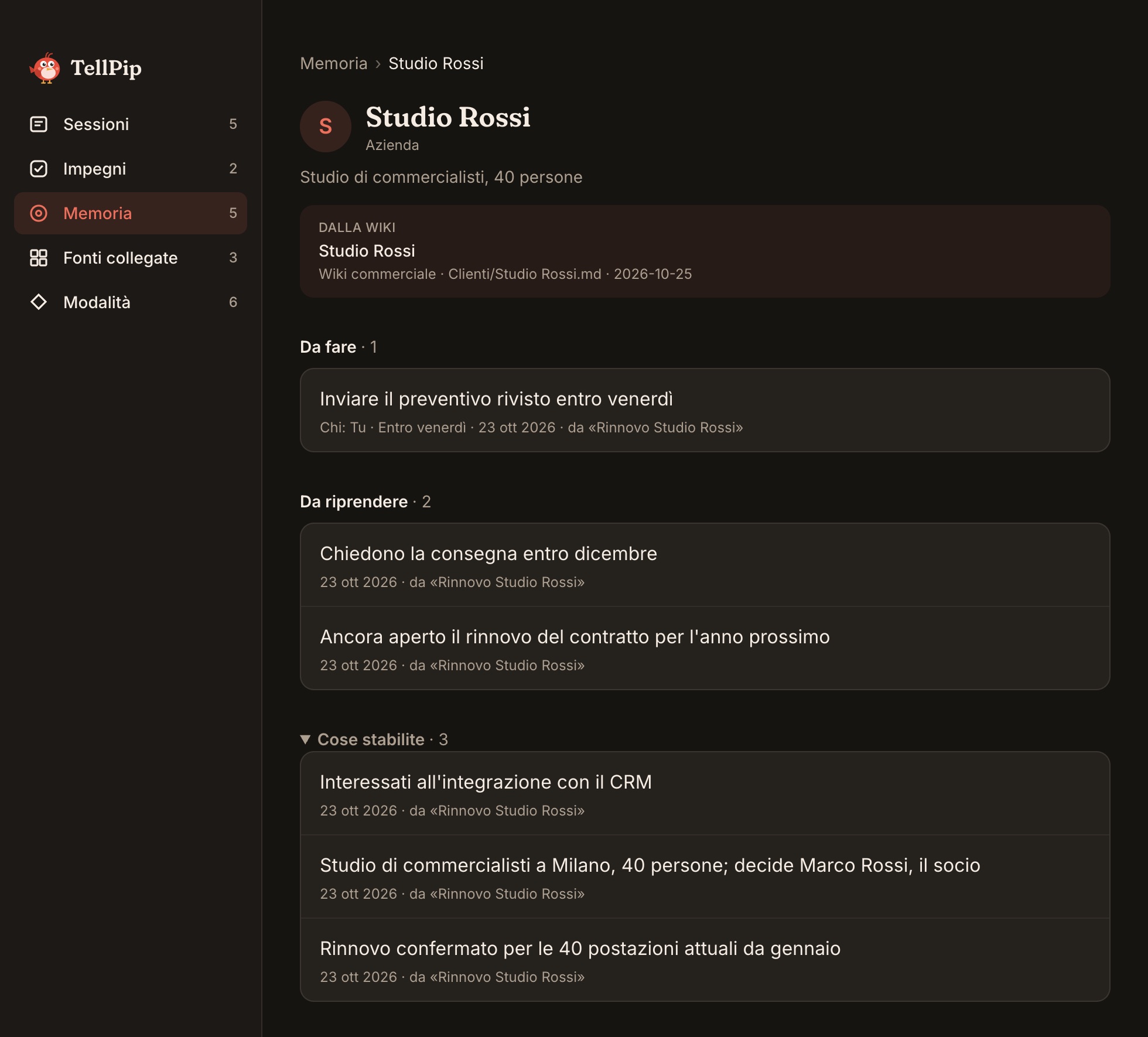
La memoria non è un archivio di vecchie trascrizioni. È un insieme di schede essenziali, una per ogni Persona, Azienda o Progetto con cui lavori. In cima a ogni scheda c’è chi è: ruolo, azienda, come vi conoscete. Poi vengono quattro sezioni:
- Da fare: cosa è stato promesso, da chi ed entro quando.
- Da riprendere: i punti ancora aperti e i temi da affrontare la prossima volta.
- Cose stabilite: decisioni, preferenze e richieste ricorrenti.
- Fatte e chiuse: impegni mantenuti e questioni risolte, per memoria.
Ogni voce è concisa e pensata per essere letta in pochi secondi, perché in call ogni secondo conta.
Com’è fatta una scheda
Ecco un esempio inventato di scheda aziendale dopo due call, per mostrarti il livello di dettaglio di Pip:
- Chi è: un mobilificio a conduzione familiare che sta per aprire un secondo showroom. Referente principale: il responsabile operativo.
- Da fare: tu mandi il preventivo rivisto entro venerdì; loro mandano le piante del nuovo showroom.
- Da riprendere: il rinnovo del contratto per l’anno prossimo.
- Cose stabilite: consegna in due lotti, il primo prima di dicembre; call la mattina; prezzi sempre con l’IVA separata.
- Fatte e chiuse: campioni dei tessuti inviati e ricevuti.
Poche righe essenziali, e sai a che punto è il rapporto prima ancora di salutare.
Come ritorna
La memoria dà il meglio di sé al momento giusto. Quando una persona che conosci viene selezionata in Chi c’è in call o nominata nella conversazione, nella chat compare una scheda: Psst… l’ultima volta con seguito dal suo nome e dalla data della vostra ultima call, con le poche cose che contano. In cima, ciò che resta da fare.
La memoria arricchisce anche le risposte di Pip. Se il cliente chiede «a che punto siamo con il rinnovo?», Pip può rispondere attingendo a ciò che si è detto nelle call precedenti, non solo in questa. Le risposte che la utilizzano portano l’etichetta memoria, così sai sempre da dove arriva l’informazione.
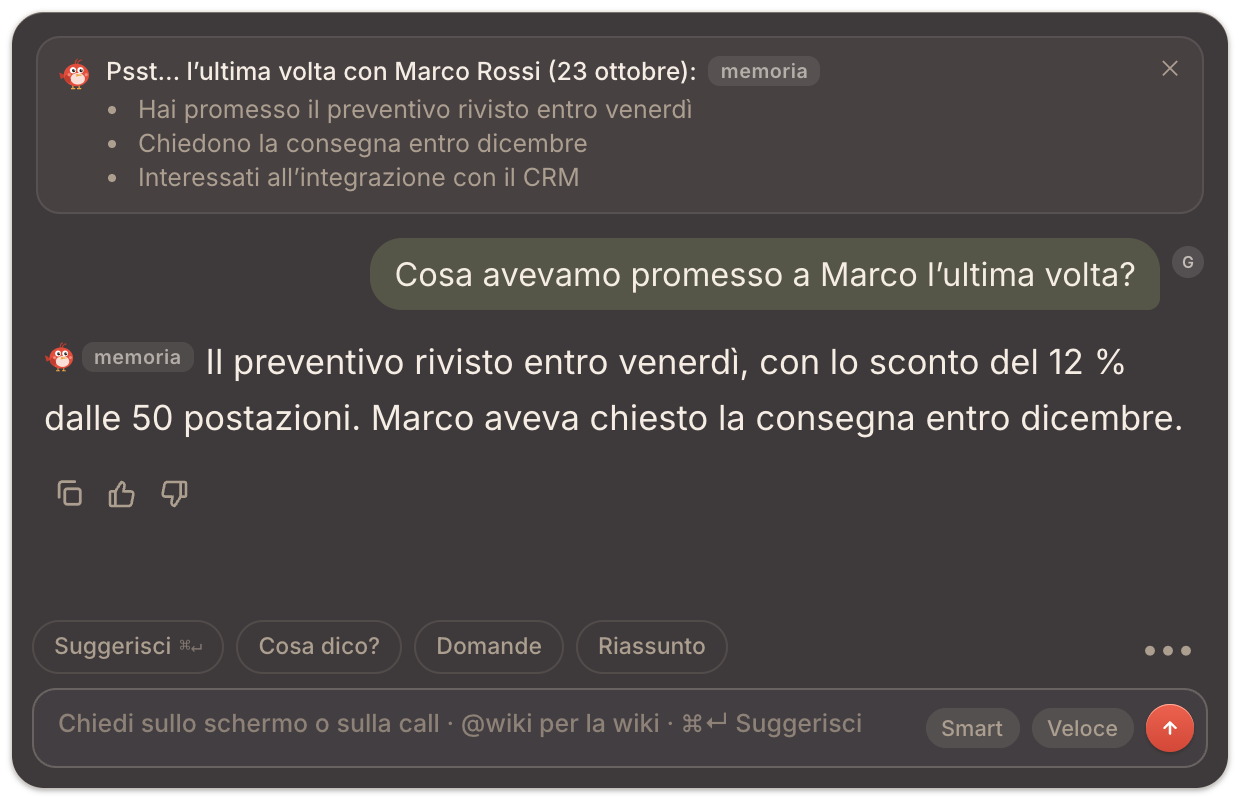
Ogni contesto resta al suo posto: in ogni modalità Pip richiama i ricordi delle call di quel tipo, mentre chi sono le persone lo sa sempre. E con Enterprise la memoria può attingere anche alla tua knowledge base.
L’obiettivo è semplice: entrare in ogni call sapendo già cosa devi e cosa ti devono.
Come impara Pip
Con Ricorda le call attivo, come è di default, Pip impara dalle tue call e aggiorna le schede al termine di ciascuna, partendo dai passaggi più significativi della conversazione. Per una memoria sempre precisa, può chiederti una rapida conferma su un nome o una data. E anche se la memoria impara già da sola, puoi dare a Pip indicazioni in più scrivendo in chat «ricorda che Marco preferisce le call la mattina» oppure «dimentica il vecchio indirizzo di consegna».
Ogni ricordo conserva anche la propria storia, così vedi come si è evoluto un impegno o una decisione.
E mentre Pip impara a conoscere i tuoi clienti, impara a conoscere anche te. Dai 👍 e 👎 accanto a ogni risposta, e dal modo in cui gli scrivi in chat, costruisce nel tempo il tuo profilo di preferenze, che trovi nella pagina Memoria: risposte sempre più su misura per il tuo modo di lavorare.
Sei tu al comando
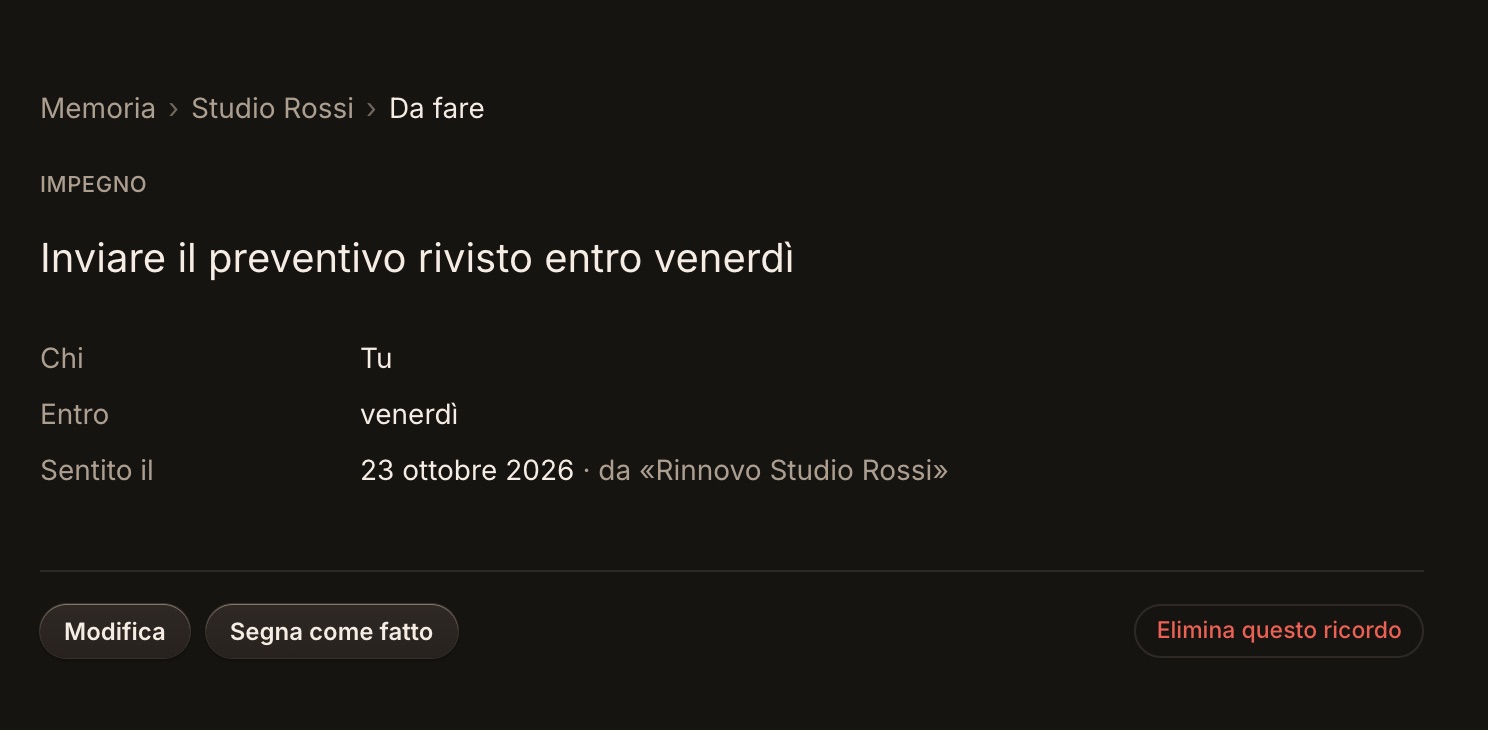
Una memoria davvero utile è una memoria che governi tu. Ogni sua parte si gestisce dalla pagina Memoria della finestra principale: dall’elenco delle schede apri una scheda, e da lì il singolo ricordo.
- Modifica una riga da aggiornare.
- Segna come fatto un impegno mantenuto, oppure Riapri.
- Elimina questo ricordo per togliere una singola riga.
- Rinomina una scheda: il vecchio nome resta come alias, così Pip la riconosce ancora.
- Dimentica (seguito dal nome) per eliminare per intero una persona, un’azienda o un progetto.
- Cancella tutta la memoria, con una conferma, per ripartire da zero.
Alcune call meritano di restare fuori dalla memoria: una conversazione privata, una questione personale, una riunione su un tema riservato. Scegli Non ricordare questa call dal menu della chat durante la call, oppure dalla sessione in seguito. Pip non trattiene nulla di quella call. E se elimini una sessione, con lei se ne vanno anche i ricordi nati solo da quella call.
Tutto sul tuo computer
La memoria è custodita sul tuo computer, insieme alle sessioni e alle note. Non viene condivisa con nessuno. Quando Pip formula una risposta, usa un breve riepilogo delle schede pertinenti, esattamente come fa con i passaggi dei tuoi documenti. E poiché le schede risiedono sul tuo computer, cancellarle significa cancellarle davvero: quando dimentichi una persona, la sua scheda scompare per sempre. Lo stesso vale per sessioni e note, che puoi eliminare una per una o in blocco. Il quadro completo è in Cosa resta sul tuo computer, e cosa serve all’AI.
Per chi è
La memoria dei clienti è inclusa in Solo, in Enterprise e nel pacchetto 5 ore, e non è una funzione extra: è il cuore di TellPip. È disponibile anche nella prova gratuita, 5 sessioni gratuite senza carta, così puoi scoprirne il valore sulle tue call. I prezzi sono nella pagina dei prezzi.
Vuoi provarla? Scarica TellPip e leggi Memoria dei clienti: cosa ricorda Pip per la guida passo passo.